Introduction to Variables
Brief on Computer RAM
In this chapter, we will also be talking about Random Access Memory (RAM) to better understand variables, but first, let's quickly cover what it is. RAM is where your computer stores the data of a running program. It is fast, but volatile (wiped when power is lost, unlike disk storage). Whenever you run your Python program, it loads it into the RAM and the instructions are then fed to the CPU by your operating system.
Variables give programmers an easy way to work with the computer's memory - they act as a bridge that lets us use and manipulate memory without dealing with it directly. That is all variables do. Different languages have different syntax, rules, types of variables, etc., but in the end, they are all doing the same task. As far as we are concerned, Python does not have multiple types of variables.
Let's take a look at how we can define a variable in python:
Let's break this down. Over here, name is what we call a variable. "Alan" is the data we're
assigning to that variable through the assignment operator (=).
Note
We will learn more about data types and operators in later chapters. We will be focusing mostly on variables for now.
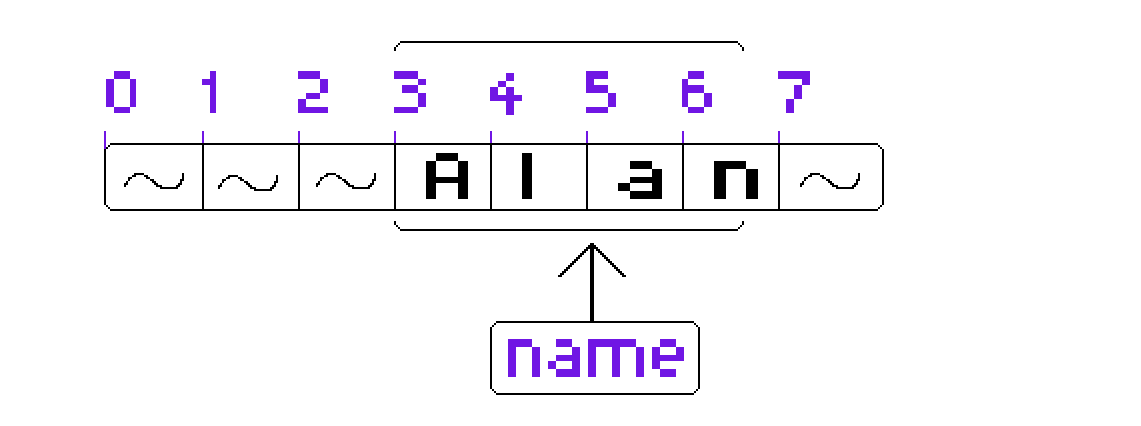
So, where does the memory that we discussed before come into play here? When we create a variable in Python, it automatically reserves some space in memory and places the data there, which the variable then points to.
Note
The above image is only an example of how variables point to memory addresses. Note that it is not a complete representation of how computer memory looks like. Only meant for understanding purposes.
In the diagram above, the variable name points to memory addresses 3 - 6; but notice we never
had to specify that in our code. That's because Python handles this tracking for us automatically.
This is really the whole point of variables: instead of manually keeping track of which data lives
at which memory address, we can just use a variable name as a clear, readable label for that piece
of memory.
Now that we understand why we use variables, we must also know the rules for declaring variables in Python. There are 4 simple rules which follow:
- Variables cannot contain any special characters other than underscore (
_). - Variables cannot have spaces in them, use underscores instead.
- Variables cannot start with a number but can contain numbers inside or at the end of them.
- Variables cannot share the same names as Python keywords (keywords are reserved words with special functionality in Python).
Case Sensitivity
Python is a case sensitive language, meaning, in this piece of code:
There now exists two variables, name and Name instead of one. A good rule of thumb is to always
use snake_casing convention for your variables which is to keep your variables in all lower cases
and use underscores for word separation.
Examples
Here is a list of invalid python variables:
full name = "James Bond"  # Contains a space
age! = 90  # Contains a special character
finally = "yes"  # Conflicts with the Python keyword "finally"
20money = 900  # Starts with a number
Below is a list of valid python variables: