Comparison and Arithmetic Operators
A quick revision of the concepts we have learned so far:
- Brief on Python history
- Variables
- Data types (strings, integers, floats, booleans)
- Built in functions
- String concatenation & interpolation
In this chapter, we will be looking at what comparison and arithmetic operations are.
Comparison Operators
Comparison Operators (also known as Relational Operators) are used to compare values. They work very similarly to how they do in mathematics.
There are six comparison operators:
| Operator Symbol | Name |
|---|---|
> |
Greater than |
< |
Less than |
== |
Equal to |
!= |
Not equal to |
>= |
Greater than or equal To |
<= |
Less than or equal to |
Comparison operators always return a boolean value (True or False) when used.
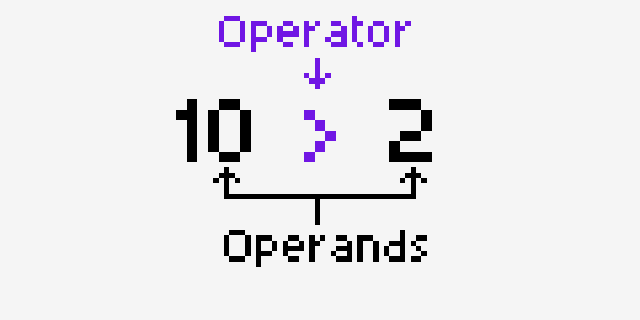
Greater Than Operator (>)
Checks if the left-hand side operand is larger than the right-hand side operand.
Running this will give us the following output: text False True False
This reads almost like plain English! 1 is not greater than 2, hence it returns False and prints
it out. 20 is larger than 1, which results in True being the output, and so on.
Less Than Operator (<)
Checks if the right-hand side operand is larger than the left-hand side operand.
Output:
Equal To Operator (==)
Checks if both left and right-hand side operands are exactly equal.
Output:
Warning
Do not confuse the Equal To Operator (==) with the Assignment Operator (=). The Equal To
Operator is used to check if both the operands are equal, whereas the Assignment Operator is used to
assign data to a variable.
Not Equal To Operator (!=)
Checks if both the operands are not equal.
Output:
Greater Than Or Equal To Operator (>=)
Checks if the left-hand side operand is either greater than or equal to the right-hand side operand.
Output:
Here, 90 is greater than 18 which gives us True as the output. 23 is not greater but it is equal
to 23 which also gives us True as the output.
Less Than Or Equal To Operator (<=)
Checks if the right-hand side operand is either greater than or equal to the left-hand side operand.
Output:
Comparison with Strings
Comparison operators aren't limited to numbers. They work with strings too. The most common use is checking whether two strings are equal:
Output:
Warning
String comparison is case sensitive, so "alan" and "Alan" are not equal:
Output:
Python compares strings character by character, so even a single difference, including an extra space, makes the strings unequal.
Using < and > with strings
The other operators work on strings as well. Python compares strings alphabetically, character by
character, so "apple" < "banana" is True because "a" comes before "b".
Be careful with uppercase and lowercase, though. Every uppercase letter is considered "smaller" than
every lowercase letter, so "Zebra" < "apple" is True.
Arithmetic Operators
Arithmetic operators let us perform mathematical calculations in Python. You've already seen one of
them, the + operator, in our calculator example. Python supports seven of them:
| Operator | Name | Example | Result |
|---|---|---|---|
+ |
Addition | 7 + 2 |
9 |
- |
Subtraction | 7 - 2 |
5 |
* |
Multiplication | 7 * 2 |
14 |
/ |
Division | 7 / 2 |
3.5 |
// |
Floor Division | 7 // 2 |
3 |
% |
Modulus | 7 % 2 |
1 |
** |
Exponentiation | 7 ** 2 |
49 |
Let's take a look at each of them.
Addition, Subtraction & Multiplication
These three work exactly as they do in mathematics:
Note
Notice that we use * for multiplication, not x. The same goes for division, where we use /
instead of ÷.
Division
The / operator divides the left value by the right value:
Notice that the second result is 2.0 and not 2. In Python, the / operator always returns a
float, even when the result is a whole number.
Warning
Dividing by zero is not possible, in Python or in mathematics. If you try, Python will stop your
program with a ZeroDivisionError.
Floor Division
Floor division (//) divides the left value by the right value, and then rounds the result down
to the nearest whole number. In other words, it throws away the decimal part:
This is useful when you only care about how many complete times a number fits into another. For example, how many full hours are in 150 minutes:
Output:
Floor division and negative numbers
Floor division always rounds down, toward negative infinity. With positive numbers this looks like the decimal part is simply cut off, but with negative numbers it behaves differently:
Output:
-7 / 2 is -3.5. Rounding down means moving to the next smaller number, which is -4, not -3.
Modulus
The modulus operator (%) gives us the remainder left over after division. Remember long
division from school? 7 ÷ 2 is 3 with a remainder of 1, so 7 % 2 is 1:
If we continue our minutes example, % tells us how many minutes are left over after taking out
the full hours:
So 150 minutes is 2 hours and 30 minutes.
Exponentiation
The ** operator raises the left value to the power of the right value:
2 ** 3 means 2 * 2 * 2, which is 8.
Order of Operations
When an expression has more than one operator, Python follows the same order of operations you learned in mathematics (often remembered as PEMDAS or BODMAS). Operators with the same priority are evaluated from left to right. Let's see it in action:
In the first line, multiplication happens before addition, so 3 * 4 is calculated first, giving
2 + 12. In the second line, the parentheses force 2 + 3 to be calculated first, giving 5 * 4.
Tip
When in doubt, use parentheses. Even if they aren't needed, they make your code easier to read and make sure the calculation happens in the order you intended.
Mixing Integers and Floats
When you do arithmetic between an integer and a float, the result will always be a float:
In-place Operations
It's very common to update a variable using its own value, such as adding to a score:
Python provides a shorter way of writing this. Placing the operator before the = does the same
thing:
score += 5 is exactly the same as score = score + 5. This works with all of the arithmetic
operators:
number = 100

number -= 20   # number = number - 20
number *= 2    # number = number * 2
number /= 4    # number = number / 4
number %= 10   # number = number %= 10
number += 1    # number = number + 1

print(number)
Output: