Conditional Statements
When developing programs, we often need our code to execute certain instructions conditionally. Let's take a simple banking program as an example.
Our task is to ask the user how much money they have so they can open a bank account. If they have
less than $25, we print a message declining the request. If they have $25 or more, we accept the
money and deposit it into their new account.
One way of doing this problem is like so:
bank_amount = 0

print("Welcome to Practical Python Bank!")
print("Let's open you an account!")

current_amount = int(input("How much money do you have (in dollars)? "))
# Don't forget to convert user input to an integer
# so we can compare it with another integer.

if current_amount >= 25:
    bank_amount += current_amount
    current_amount = 0

    print("You have successfully opened a bank account!")
    print("All your money has been deposited.")
    print(f"You have ${bank_amount} in your account.")

else:
    print("Sorry, you cannot open an account.")
    print("You need at least $25 to open a bank account.")
Running the program and entering a number below 25 gives us:
Welcome to Practical Python Bank!
Let's open you an account!
How much money do you have (in dollars)? 10
Sorry, you cannot open an account.
You need at least $25 to open a bank account.
Now let's enter a value of 25 or more:
Welcome to Practical Python Bank!
Let's open you an account!
How much money do you have (in dollars)? 25
You have successfully opened a bank account!
All your money has been deposited.
You have $25 in your account.
Warning
When entering input, type only the number itself, with no $ symbol or other characters. The
int() function can only convert strings that look like whole numbers (such as "25"), so text or
symbols (such as "$25" or "twenty") will make it fail with an error. The same applies to
float(), which accepts numbers like "12.5".
The code almost reads like plain English! If you don't understand what's going on immediately, it's
alright. We'll take it apart and see what each piece is doing. First, the if statement.
if Condition Statement
This is the starting block of any conditional statement. Its general syntax is:
Note
In programming, syntax refers to the grammar of a language. Just as grammar lets us form coherent sentences in human languages, syntax tells the computer how to read our code.
The if condition statement only runs the <code> within it when the <boolean> is True. Here's
an example:
if True:
    print("Hi")
    print("Running from the True statement")
    print("Good bye!")

if False:
    print("Hello")
    print("Running from the False statement")
    print("See you later!")
Upon running this code, we get the following output:
The code within the if False: statement never ran.
One important thing you may have noticed so far is the indentation (the four spaces in front of each
print calls). In Python, indentation is what tells the computer that "this block of code belongs
to this statement".
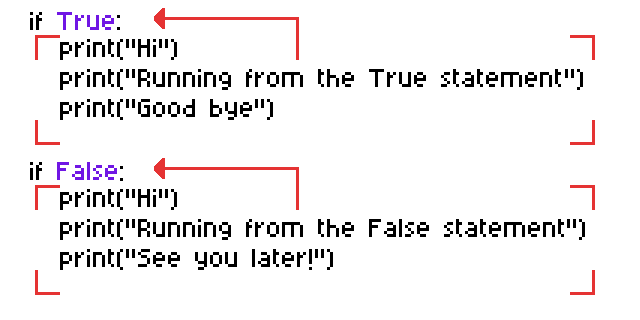
A quick way to remember when you need to apply indentation is to look out for colons (:). If a
statement ends with a colon, it means that the next line must be indented one level further. Python
recommends 1 indent to consist of 4 spaces.
Warning
You can press the Tab key to place indents in your code. Depending on the code editor you use, it can either place spaces or a single tab character. If your editor places a tab character, make sure to change it to spaces.
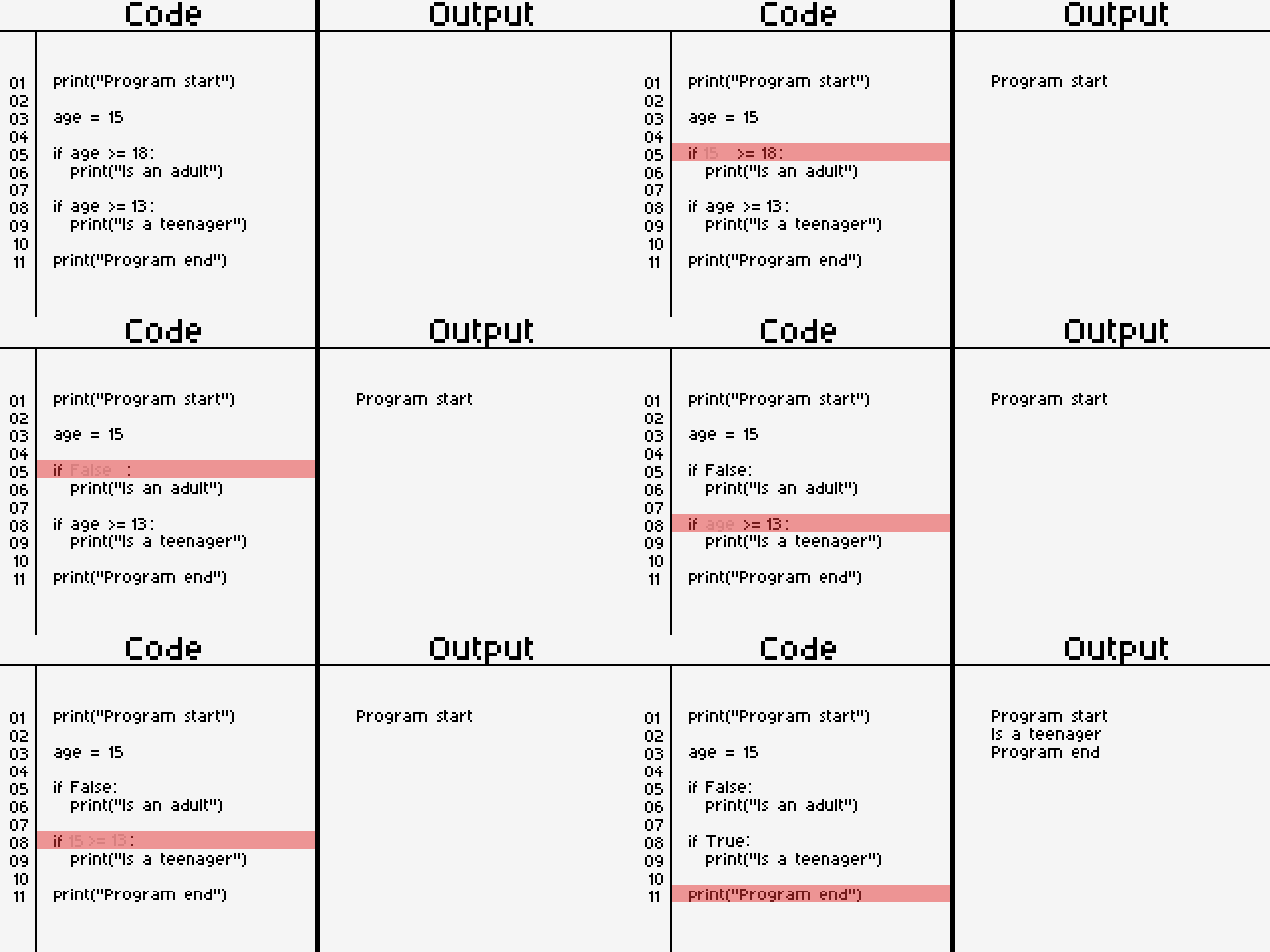
From the previous chapter, we have learned about how comparison operators return a bool. The same concept is being used here. Let's take a look at an example and an animation that explains how it works.
print("Program start")

age = 15

if age >= 18:
    print("Is an adult")

if age >= 13:
    print("Is a teenager")

print("Program end")
When you run your code, this is how Python will interpret it:
Note
This program isn't perfect. There are some glaring issues; can you notice them before we fix it in the next subtopics?
else Condition Statement
The else statement runs when the condition of the if directly above it is False. Its general syntax is:
<code-2> only executes when the <boolean> of the if statement is False. Let's look at a few
examples to get familiar with it.
Output:
if False:
    print("if statement 1 executed")
if False:
    print("if statement 2 executed")
else:
    print("else statement executed")
Output:
if True:
    print("if statement 1 executed")
if False:
    print("if statement 2 executed")
else:
    print("else statement executed")
Output:
Note
An else always belongs to the if directly above it, and it can't stand on its own. Writing an
else without an if before it raises a SyntaxError.
Now that we are familiar with its syntax, let's take a look at our example from the previous section.
print("Program start")

age = 15

if age >= 18:
    print("Is an adult")

if age >= 13:
    print("Is a teenager")

print("Program end")
You may have noticed a few problems with it. If not, assume age is 7 instead. What would be the
output then? Once you have figured it out, check your answer in the collapsible block below:
Fixing our age program (v1)
As you can see, that is not the output we'd like. We would still want the program to print
something. This is where our else statement can help us.
print("Program start")

age = 7

if age >= 18:
    print("Is an adult")

if age >= 13:
    print("Is a teenager")

else:
    print("Is below 13")

print("Program end")
Output:
Our program still isn't perfect. Try finding the issue by tweaking the value of the age variable.
Nesting Conditional Statements
An if or else block can contain any code, including other if and else statements. Placing a
conditional statement inside another one is called nesting. The inner statement only gets
checked if the outer one allows its block to run.
Our previous example still had one problem in it. What if the age variable was, let's say, 25?
print("Program start")

age = 25

if age >= 18:
    print("Is an adult")

if age >= 13:
    print("Is a teenager")

else:
    print("Is below 13")

print("Program end")
Its output would be:
This is wrong again. We would like the program to only print out Is an adult for ages 18 and
above. But that doesn't seem to be the case since the age satisfies both conditions.
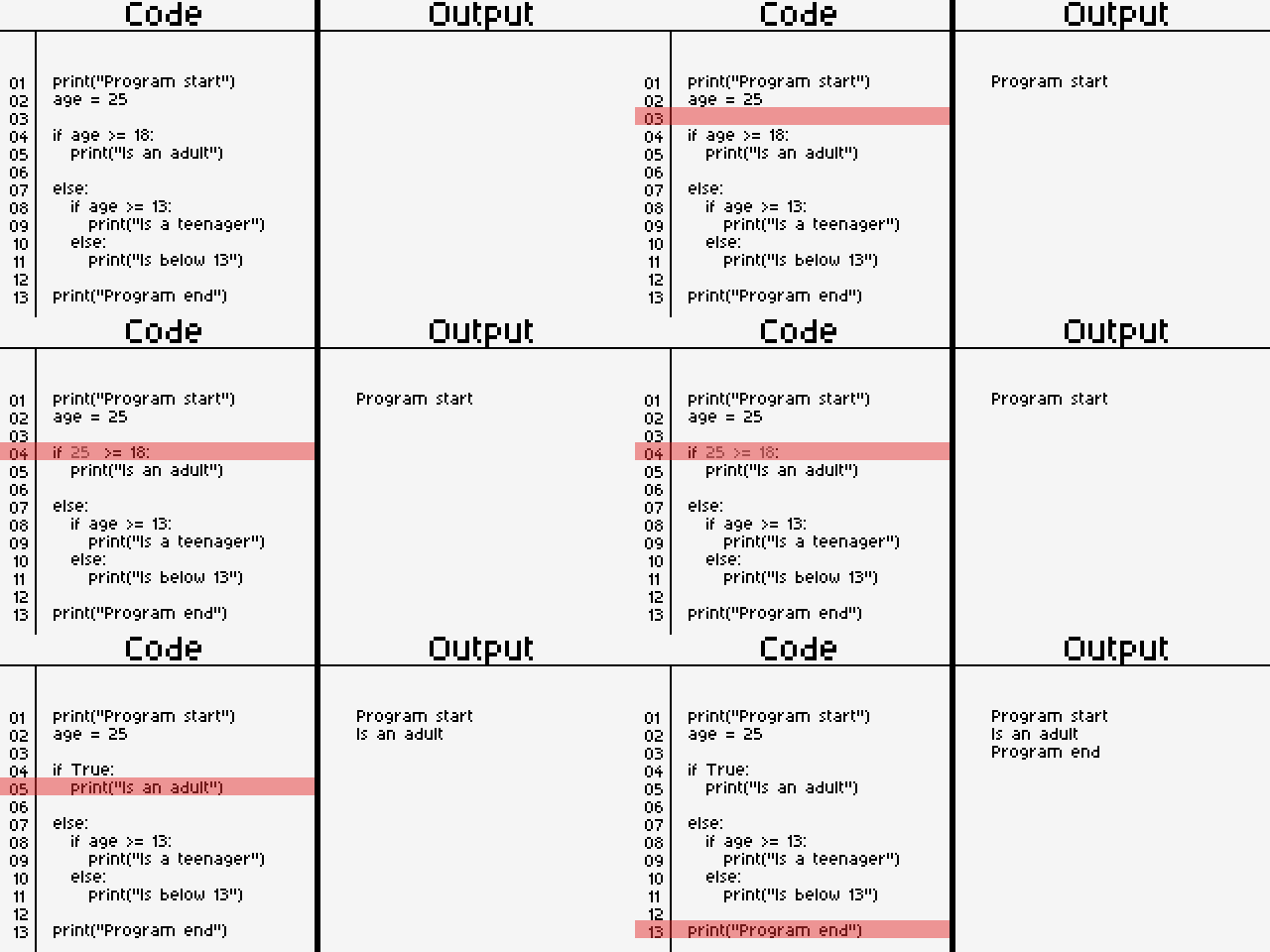
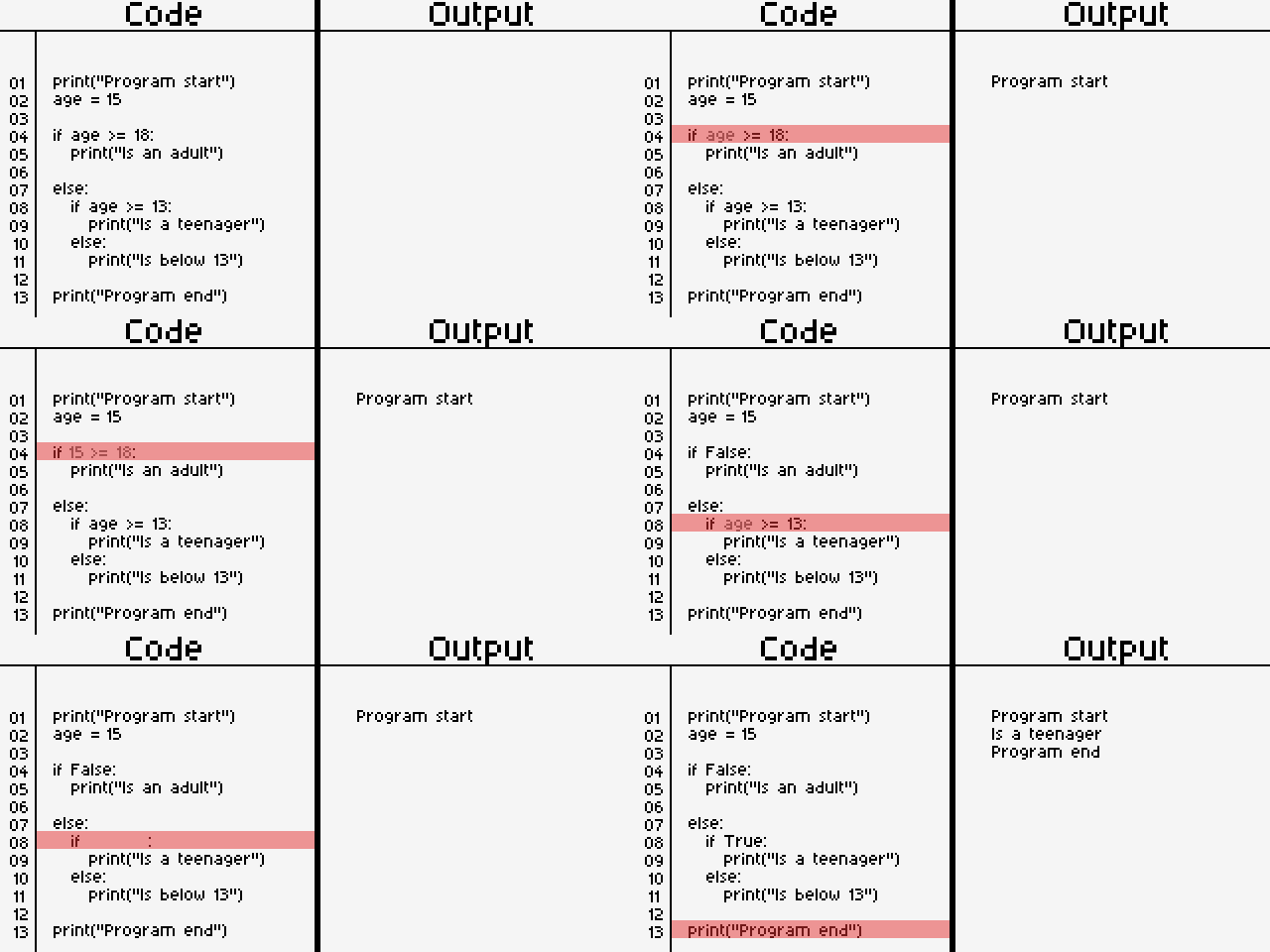
Let's look at how nested conditional statements helps solve this with different values.
Fixing our age program (v2)
Note
There's no limit to how deeply you can nest statements, but each level adds more indentation and makes the code harder to follow. If you find yourself nesting more than two or three levels deep, there is usually a cleaner way to write it. We'll look at one in the next section.
elif Statement
The elif statement is a combination of else and if with a cleaner syntax. As always, let's
have a look at its syntax:
<code-2> only executes when the <boolean> of the if is False and the <boolean> of the
elif is True.
In a series of regular if statements, each statement is independent of the others. But if- and
elif-statements are dependent on each other. This is because the pseudocode above is the same as:
Remember the else: followed by an indented if from our nested example? elif is just a shorter
way of writing it.
Fixing our age program (v3)
Let's rewrite our age program using elif:
print("Program start")

age = 25

if age >= 18:
    print("Is an adult")
elif age >= 13:
    print("Is a teenager")
else:
    print("Is below 13")

print("Program end")
This does exactly the same thing as our nested version, but with no extra indentation.
Take age = 25. Python checks age >= 18, finds it True, and runs that block. It then skips the
elif and else entirely, without even checking age >= 13. With age = 15, the first condition
is False, so Python moves on to the elif, which is True, so it runs that block and skips the
else. Only when every condition above is False does the else run.
Using multiple elif statements
You can chain as many elif statements as you need between the if and the else:
Python checks the conditions from top to bottom, and runs the block of the first condition that
is True. Every other block in the chain is skipped, even if its condition would also have been
True. Let's take a grading program as an example:
score = 85

if score >= 90:
    print("Grade: A")
elif score >= 80:
    print("Grade: B")
elif score >= 70:
    print("Grade: C")
else:
    print("Grade: F")
Output:
A score of 85 is also greater than or equal to 70, but Python never gets that far. It stops at
the first True condition, score >= 80.
Warning
Because Python stops at the first True condition, the order of your conditions matters. What
do you think happens if we check the smaller age first?
Output:
25 >= 13 is True, so Python runs the first block and never reaches age >= 18. The adult block
can never run for any value. When using ranges like this, check the most specific (or highest)
condition first.
if vs elif
Let's compare the two with the same value, age = 25:
With separate if statements, every condition is checked on its own, so more than one block can
run. With elif, the chain stops after the first match. Use separate if statements when the
checks are unrelated, and elif when you want exactly one outcome out of several.
Note
A conditional chain follows these rules:
- It must start with exactly one
if. - It can have as many
elifstatements as you need, all placed after theif. - It can end with at most one
else, which is optional and always comes last.
An elif or else without an if before it raises a SyntaxError.
Truthy and Falsy Values
In Python, every value can be treated as a bool. Values that aren't actually a bool are considered
either truthy (they behave like True) or falsy (they behave like False). Let's take a
look at what exactly makes a value one or the other.
Any non-empty string, or in the case of integers and floats, any number other than 0, is
considered truthy.
The opposite is true for falsy values. An empty string, or the number 0 (or 0.0), is considered
falsy.
We can confirm this by using the bool() function. It takes in a value of any data type and
converts it into a bool, following the rules above. This is type casting again, just like int()
and str().
print(bool(100))
print(bool(-330))
print(bool(0))

print()  # Prints out an empty line

print(bool(0.0))
print(bool(0.1))

print()

print(bool("This is a non-empty string."))
print(bool(""))
print(bool("0"))  # This is a string, and it's non-empty.
Its output is as follows:
Warning
The string "0" is truthy, even though the number 0 is falsy. Only a completely empty
string ("") is falsy. The same goes for "False", which is just text, and a string containing
only a space (" ").
Using truthy and falsy values in conditions
So far, we have placed bools and comparisons (like age >= 18) after an if. But an if statement
actually accepts any value and implicitly converts it into a bool. This lets us skip the comparison
in some cases.
A common use is checking whether the user typed anything at all:
name = input("Enter your name: ")

if name:
    print(f"Hello, {name}!")
else:
    print("You didn't enter a name.")
If the user types Alan, name is "Alan", which is a non-empty string and therefore, truthy:
If the user just presses Enter, name is "", which is falsy, so the else block runs:
This is the same as writing if name != "":, only shorter. Both are correct, so use whichever you
find easier to read.